 Games
Games  Log in
  Live
Live  Promotions
Log In to Your Crownjewelz Casino Account
CrownJewelz Casino requires UK players to sign up to access games, bonuses and loyalty program. Registration at Crown Jewelz Online Casino takes 3–4 minutes. It involves creating Crown Jewelz Casino login credentials, verifying your email and completing your profile. KYC is also required before your first withdrawal under the UK gambling laws.
How to Log In to CrownJewelz
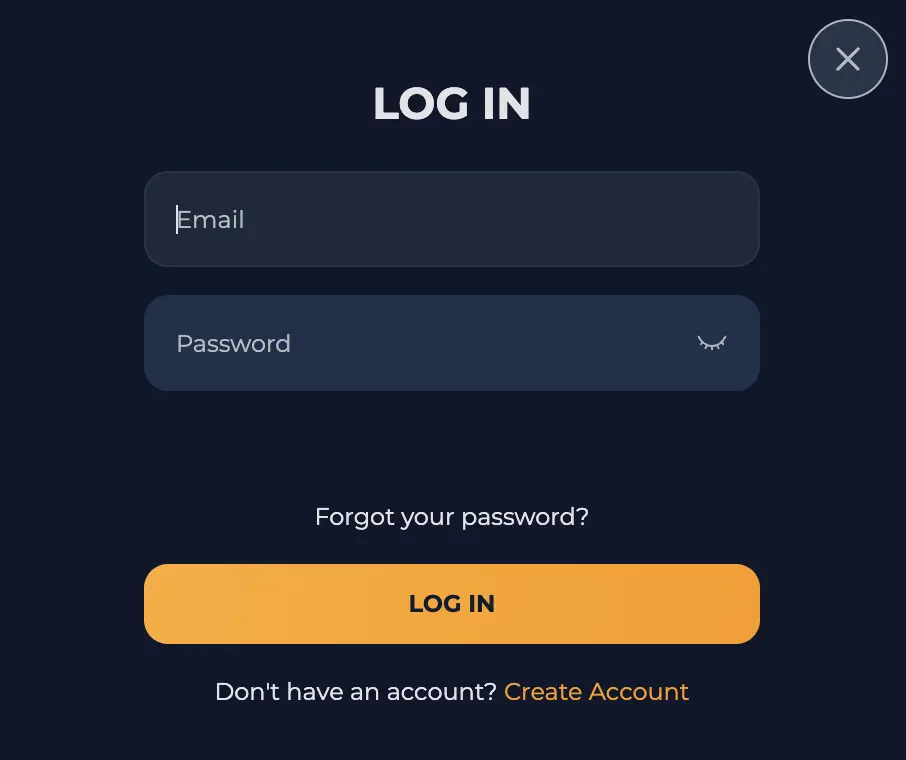
The CrownJewelz login requires a registered email and password. The login button is found at the top of the screen on your desktop and phone.
- Click the Log In button: To begin the CrownJewelz login process, select the Log In button.
- Enter credentials: Enter the email and the password.
- Confirm: Check the spelling of the details. Confirm the email is correct and the password has all the characters you registered.
- Enter: Click the Log In button to submit the form. You will gain instant access if your credentials are correct and your account is not suspended.
Crown Jewelz Login on Mobile: PWA and Browser Access
You can access our site via mobile browser or PWA. The login processes are similar on both.
- Load Crown Jewelz: Open the PWA or load our site on your browser.
- Open the form: Tap the Log In button at the top or at the bottom on your phone.
- Enter credentials: Enter your email and password.
- Submit: Tap Log In to enter your account.
2FA and CrownJewelz Login Protection
You can keep your account secure using a password and 2-factor authentication apps. The website is encrypted to protect your data while signing up or depositing. Here are protection measures that you can use:
- Password: Create a strong password. You can change it in your profile.
- 2FA: Use Google 2FA or any other 2-factor authentication apps. You will get a time-limited code to sign in to your casino account.
- SSL encryption: The login page is encrypted using 128-bit SSL encryption to prevent data leakage.
How to Register at CrownJewelz
The CrownJewels sign up is a three-stage process that you can complete within 3–4 minutes.
- Open the sign-up form: Click the Sign Up button at the top on your phone or desktop.
- Enter your details: Type your email and phone number.
- Create password: Create a strong password to protect your account. It should contain eight characters.
- Date of birth: Enter your date of birth to confirm you are legally old enough to join our site.
- Accept terms: Click the box to accept our terms.
- Email verification: Go to your email and open the link to verify.
- Complete your profile: Go to your profile section and fill in your profile, including your name, address, postal code, city and gender.
You need the following to complete CrownJewelz sign up:
- A minimum age of 18 years
- Valid email
- Valid personal phone number
- A valid address
- A payment method registered to your name
KYC Verification at CrownJewelz
Know Your Customer (KYC) is a mandatory requirement, especially once it is triggered, otherwise your account can get suspended for failing to comply.
| Verification type | Accepted documents |
|---|---|
| Identity | Passport, ID |
| Address | Phone bill, bank statement, utility bill in your name and address |
| Payment | Photo or screenshot of your payment method showing the deposit |
After submitting your CrownJewelz sign up form and depositing at least once, you can verify your account. You can also wait until your first withdrawal or until the process is triggered. Go to your profile and click Account, then Verification. Upload your documents, starting with identity verification. Accepted formats for your documents include PDF, PNG and JPG. If your documents are rejected, you will get a notification via email or upon signing in. Fulfil the conditions stated in the notification and upload your documents promptly. The KYC process takes around 12 hours.
Crown Jewelz Casino Login Problems and Solutions
Players may face login problems such as forgotten password, but these issues have simple solutions.
| Login problems | Solutions |
|---|---|
| Forgotten password | Enter your password correctly by typing the symbols and letters in the order you entered them during registration. If you cannot remember the password, reset it by clicking the “Forgot your password?” button. |
| Invalid email | Use the email address you used during CrownJewelz sign up. You cannot gain entry by entering unregistered email or an email that does not match your password. |
| Account suspension | CrownJewelz login details cannot work on suspended accounts. We share the reason for suspension in your email. Meet the requirements to regain access. |
| Geo lock errors | Disable VPN and submit your login form again. |
| Technical issues | Clear cache is you are logging in with saved credentials after resetting your password. Update your browser or use a compatible browser such as Chrome to open the site. |
How to Reset Your CrownJewelz Password
You can reset Crown Jewelz login details by following the steps below:
- Open the login form: Click the Log In button.
- Find the reset link: Click “Forgot your password?” to open the reset form.
- Share your email: Enter the email of the account whose password you want to reset.
- Change your password: Open the link sent to your email. Enter your new password and confirm. You will automatically enter your account.
- Contact support: If you did not receive reset instructions, reach out to customer support.
How to Close Your Crown Jewelz Account
Closing your account will deactivate it, and your sign-in details will become invalid. Withdraw your remaining balance and follow the steps below to close your account:
- Sign in: Enter your account and go to the contact page. You can open the live chat or use the email address from the support page.
- Write your request: You need to submit a formal request for deleting your account. Write your request clearly.
- Verification: An agent may request an ID photo or ask a few questions. Answer them and upload requested documents.
- Wait: Wait for a confirmation message in your email.
The process takes up to 48 hours and is irreversible.